ENG
ENG JPN
JPNRemittance card overview
-
If you frequently send money to the same recipient, we recommend an ATM Remittance card that can be used at Lawson stores in Japan.
-
What is a Remittance card?
-
Remittance card is an "automatic bank transfer card" for making payments to our designated bank account.
With a Remittance card, you can easily transfer money to a designated recipient by simply depositing money into the card. Unlike applying for a transfer on a website or at a counter, there is no need to specify recipient information or the purpose of the transfer, and the transfer can be completed easily and quickly.
-
How to apply and use?
-
Apply for a Remittance card
Please register your remittance destination information, remittance purpose, etc. and apply for a card. You can apply for a Remittance card from the "ATM Remittance card application" menu on your member's personal page.
Once you have your ATM card
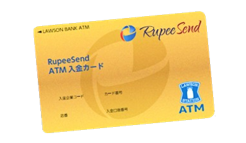
When your card arrives, please check that the card number, delivery method, currency, and recipient name on the card are correct.
Deposit the amount you wish to send
The amount transferred will be the amount after deducting the remittance fee and Lawson ATM deposit fee.

-
-
Remittance card details
Basic requirements
Distribution conditions
1. Members who have completed the identity verification process and registered as Rupee Send members.
2. Members who have registered recipient information and applied for a Remittance Card.
Purpose of remittance
Remittance limit
Minimum transfer amount
Recipient country and currency
Remittance fee
Business hours
Remittance completed
* In the case of direct debit, due to system issues, it may take up to 3 business days for the money to be deposited into the recipient's bank account.
Deadline for acceptance: Same-day remittance
Cancellation Refund
2. If the recipient does not accept the remittance for more than 30 days, the remittance request will be canceled without prior notice.
3. If we determine or suspect a violation of the pre-agreed terms of use, the remittance request may be canceled without prior notice.
4. As a general rule, only the remittance amount will be refunded. Other fees and costs will not be refunded.
*Bank transfer fees associated with refunds are the customer's responsibility.
*The refund amount will be the remittance amount minus all fees and costs. Refunds may take approximately 4 business days.
Changing Recipient Information
*In this case, please cancel your transfer request and submit it again.
To change your recipient information, please contact the Rupeesend Customer Service Center.
Changing Remittance Destination Information
*If you need to make changes, please cancel the remittance and request a new transfer.
To change the remittance destination information specified when issuing your remittance card, contact the Customer Center and then enter the desired remittance destination information on your My Page.
Contract/Important Notice
Additional Information
• The "receiving location" refers to the location of an agency or branch such as xxxxxx, which provides remittance payment services in partnership with our company.
• Transaction details can be viewed on the My Page on the RupeeSend website.
*One deposit is treated as one remittance request. Please note that two deposits will be processed as two remittance requests.
• Deposits from Japan Post Bank ATMs are limited to 100,000 yen. To deposit amounts exceeding 100,000 yen, please visit a Japan Post Bank counter. You will be asked to present identification.
How to use a Remittance card
Please follow the next steps:
-
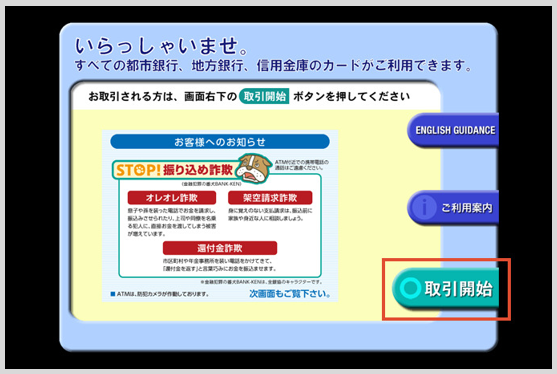
1. Press the "Start Trading" button
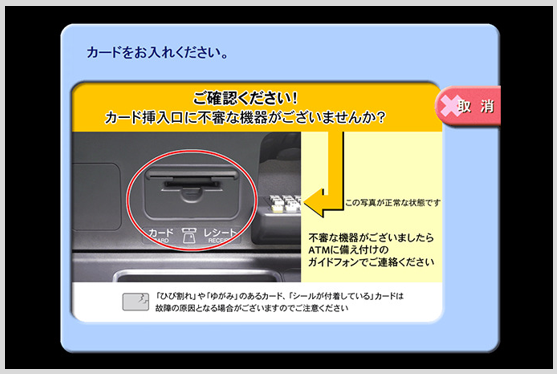
2. Insert the Remittance card
-
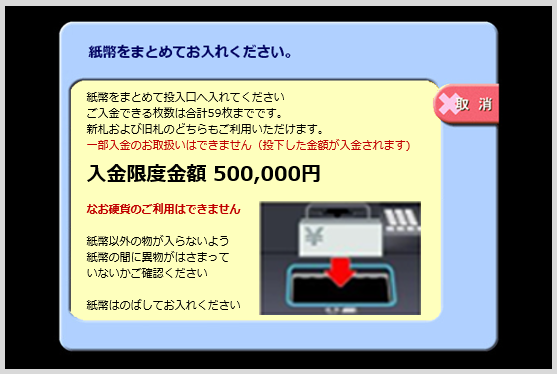
3. Insert cash
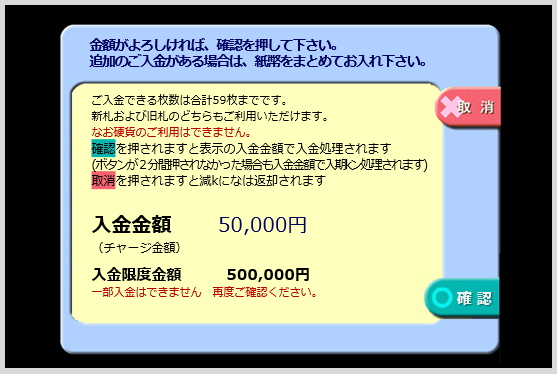
4. If the amount is correct, press the confirm button
-
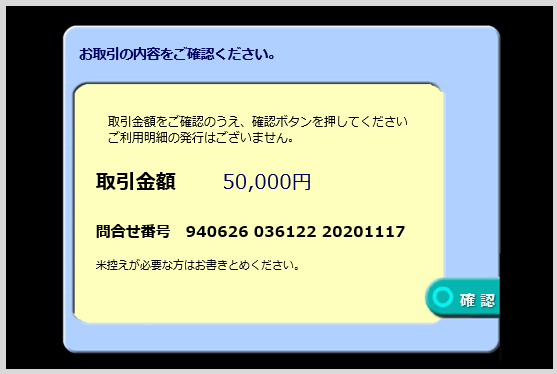
5. If the transaction details are correct, press the confirmation button.
6. Receive your card and receipt